UX Research & Design

FetchIt

A mobile app for pet owners

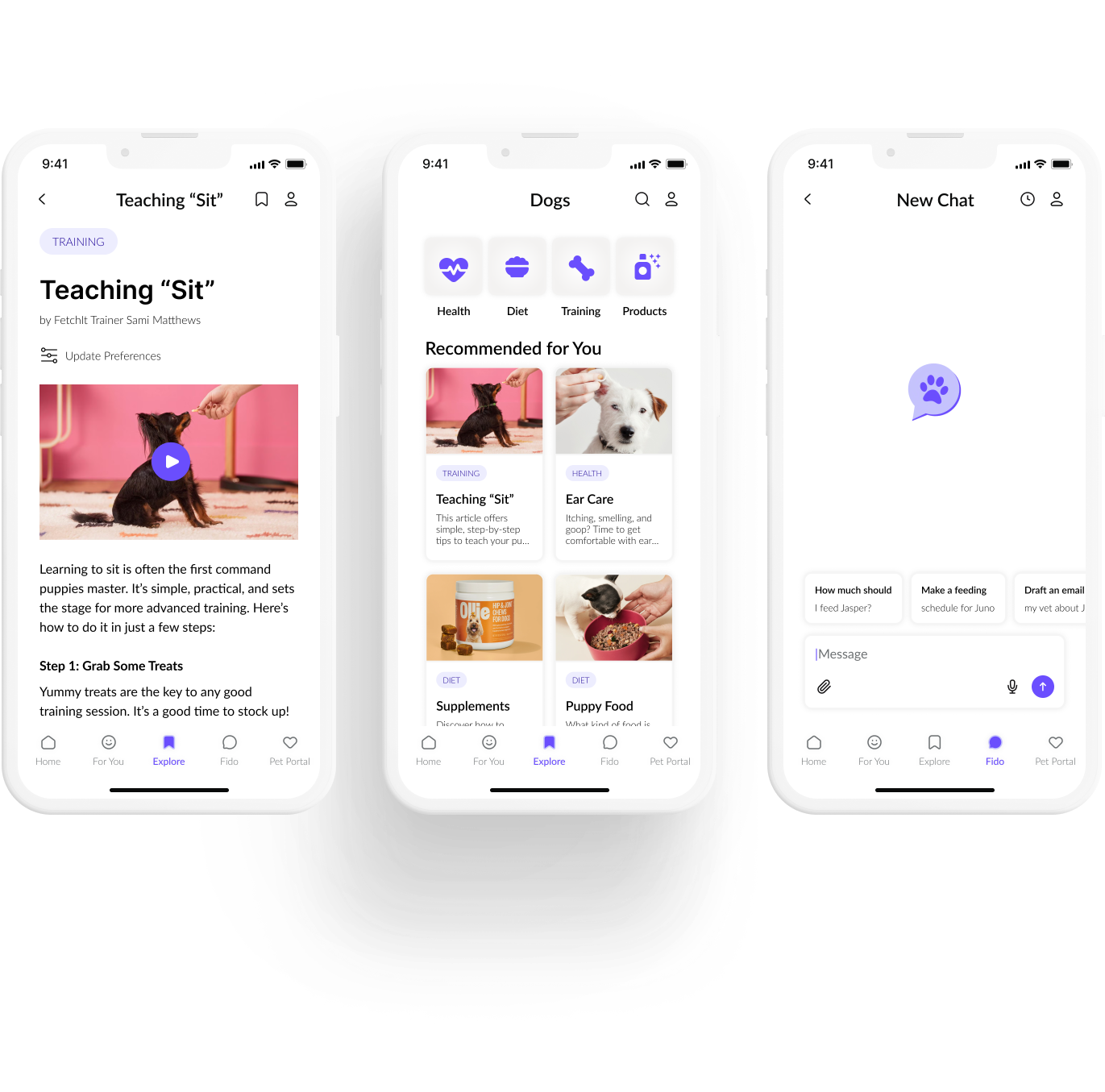
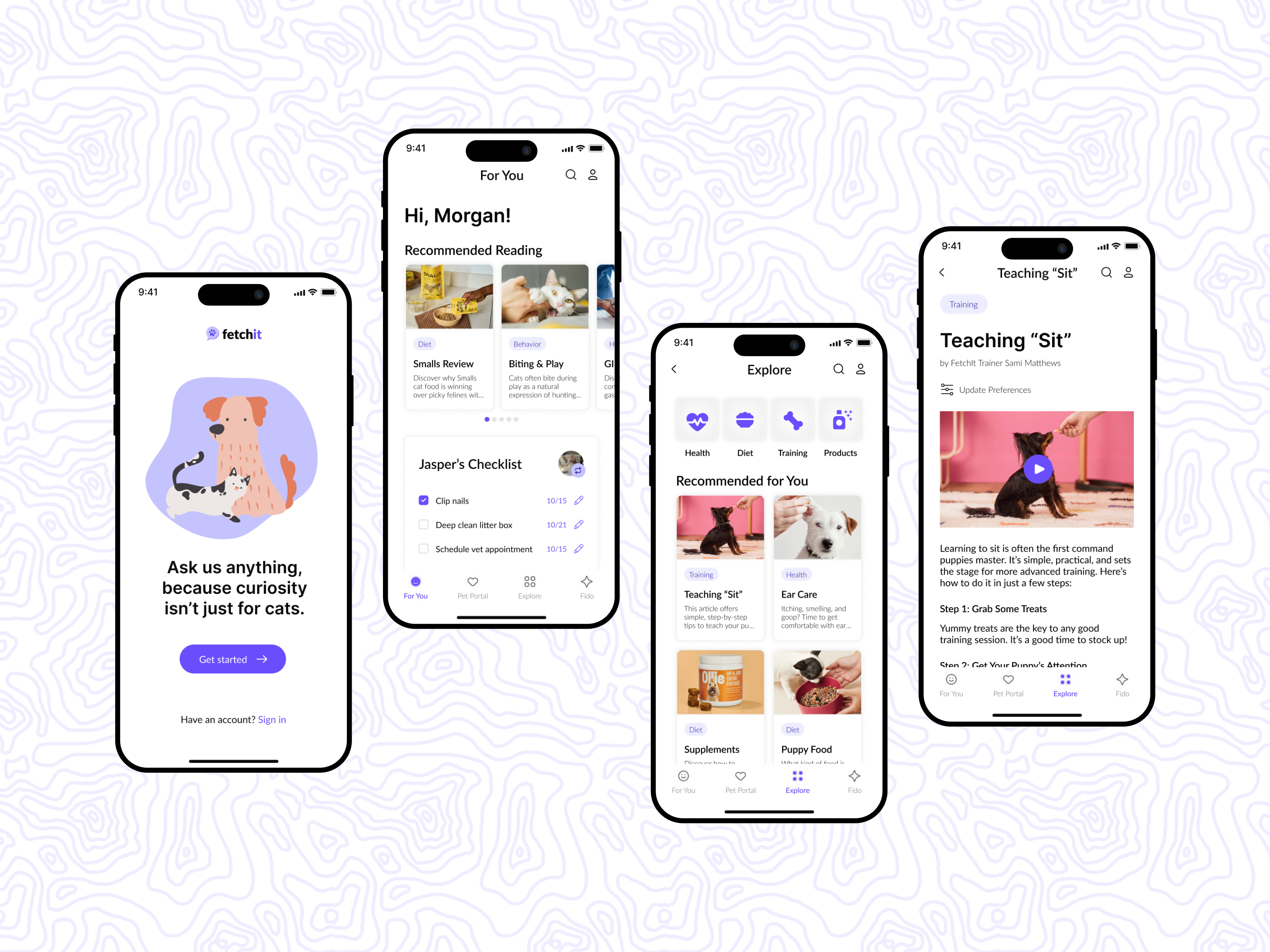
mobile app mockups

Role

UX Researcher & Designer

Duration

4 months

Tools

Figma, Figjam, Google Drive, Notion

METHODOLOGY

Competitive Research, User Interviews, Personas, Affinity Mapping, Wireframes, Prototyping, Accessibility Audit, User Testing

Solution

FetchIt consolidates pet care knowledge into a single, user-friendly mobile app. By combining conversational AI with short tutorials, clear written guides, and visual aids, FetchIt offers personalized guidance in whichever format works best for each user. The app’s friendly and inclusive design reduces stress, increases confidence, and ensures accessibility for a wide range of new pet owners.


Problem

For first-time pet owners, finding trustworthy information can be stressful and time-consuming. Resources are scattered across articles, videos, forums, and veterinary sites, often using inconsistent or jargon-heavy language. This lack of a unified, accessible system creates confusion and increases cognitive load, especially for users with limited time or accessibility needs.


👀 Take a Peek

Splash Page & Sign In

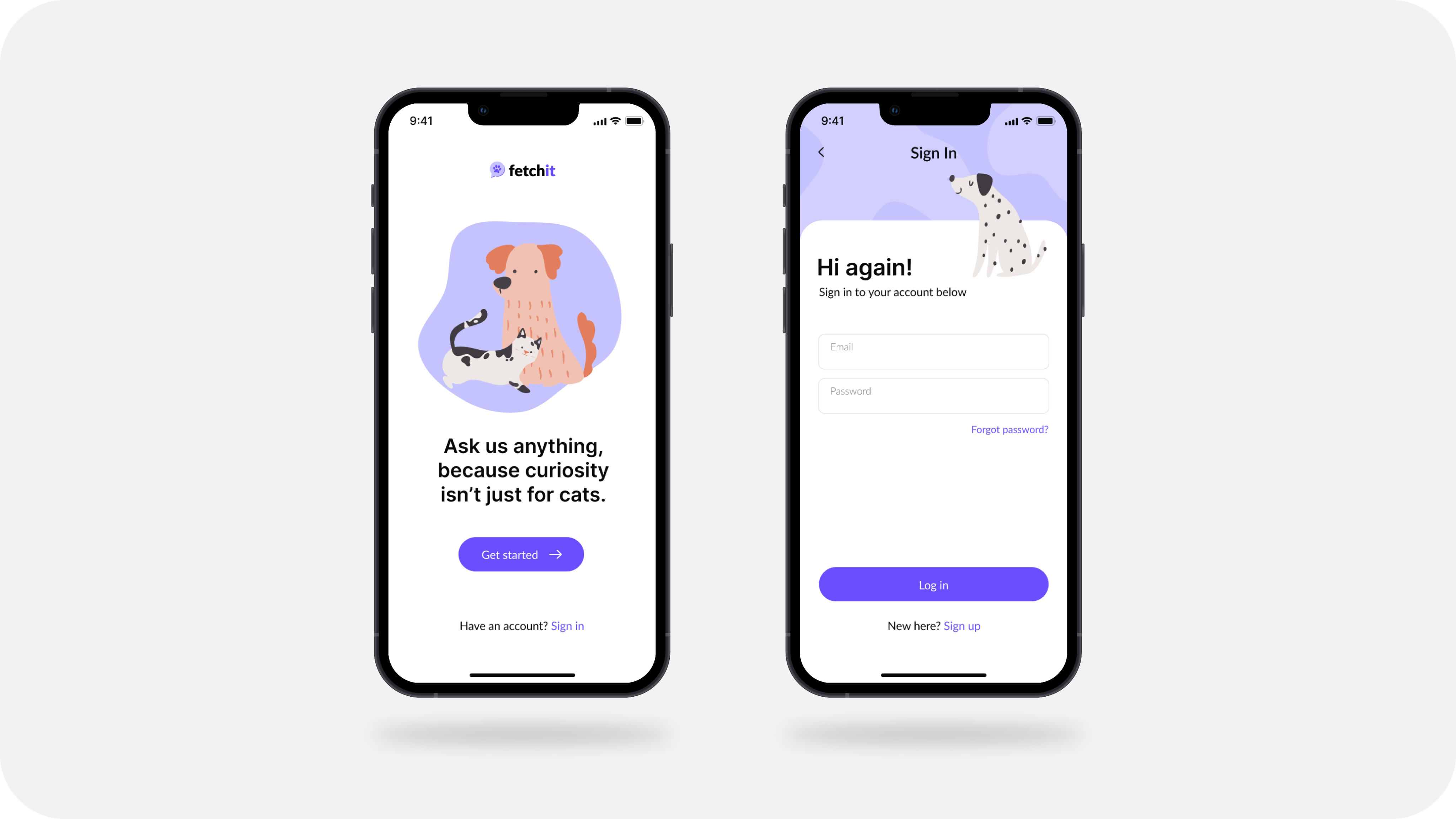
A simple, welcoming onboarding flow introduces new users to FetchIt and makes getting started quick and accessible.

Next →

← Back

Research

Research Questions

  1. What learning formats do pet owners find most effective and engaging?
  2. How can different accessibility needs be accounted for?
  3. In what contexts would users prefer an AI assistant over traditional resources?
  4. What pain points exist in current pet care information resources?

Competitive Analysis

To understand the current landscape of learning and support tools, I analyzed four platforms that provide educational content or community-driven knowledge: Khan Academy, Reddit, PetCoach, and Coursera. I evaluated each based on strengths, weaknesses, features, learning styles supported, and accessibility observations..

I then compared each platform against the six mapped features to determine which features I want to include in my app.

competitive analysis feature matrix

From these comparisons, three clear gaps emerged:


Personalization:

Existing tools don’t adapt to the user’s experience level.


Multi-format accessibility:

No platform combines text, visuals, video, and conversational guidance in one place.


Balance of trust and ease of use:

Must choose between expert information (PetCoach) and approachable advice (Reddit).

These findings directly informed FetchIt’s solution: an inclusive, AI-forward app that combines expert reliability, community-style accessibility, and multiple learning formats in a single mobile platform. By doing so, FetchIt aims to close the gap between trustworthy guidance and flexible learning experiences.

Preliminary Survey

To get an initial understanding of my user base, I created a survey to collect background and demographics information. This covered the following topics:


  1. About you
  2. About your pets
  3. Current habits
  4. AI opinions
  5. Additional information & wrap up

Findings

  • Pet owners seek online information, preferring short articles, infographics, and step-by-step guides.
  • Strong interest in a dedicated AI pet care assistant, despite limited current usage.
  • New pet owners specifically need information on harmful substances and common ailments; AI is helpful for unusual health issues.


Design Implications

  • Offer diverse content formats (articles, infographics, guides) and robust search functionality.
  • Integrate community features for sharing experiences.
  • Develop a prominent, trustworthy, and personalized AI assistant with a feedback mechanism.
  • Implement critical information alerts, a symptom checker, new pet owner onboarding, and pathways to veterinary resources.

Take a look at the survey here!

User Interviews

To begin to understand user needs, I conducted user interviews. I began by brainstorming questions and sorting them into buckets, which would end up mapping directly to my objectives for the interview process.

interview question card sorting

Findings

  • Pet owners seek pet care information online, preferring visual and concise formats.
  • High interest in a personalized AI assistant, but trust and accuracy are key concerns.
  • Friends and family are trusted for non-medical advice; online forums are viewed with skepticism for medical information.
  • Overwhelming information and conflicting advice are major stressors.


Design Implications

  • Offer diverse, visually rich, and concise content.
  • Develop a trustworthy, personalized AI assistant with fact-checking and vet integration.
  • Incorporate community features and clear pathways to professional resources.
  • Design for accessibility with less text-heavy layouts.

Personas & Empathy Mapping

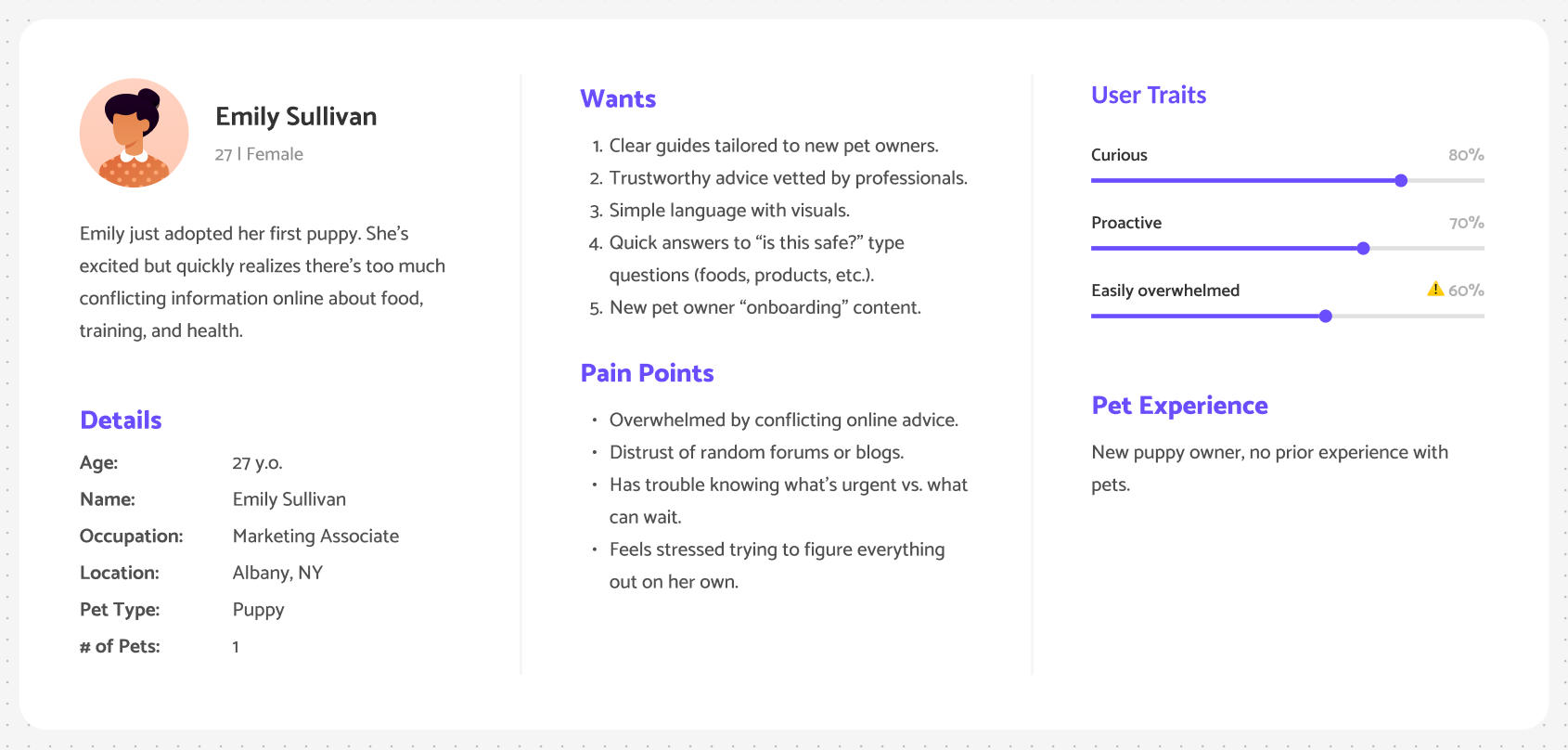
Finally, I compiled the research findings (including competitive analysis, user interviews, and survey) into 3 personas, each with a corresponding empathy map for each, shown below.

new pet owner persona
busy student persona
technology averse persona

Design

Sitemap

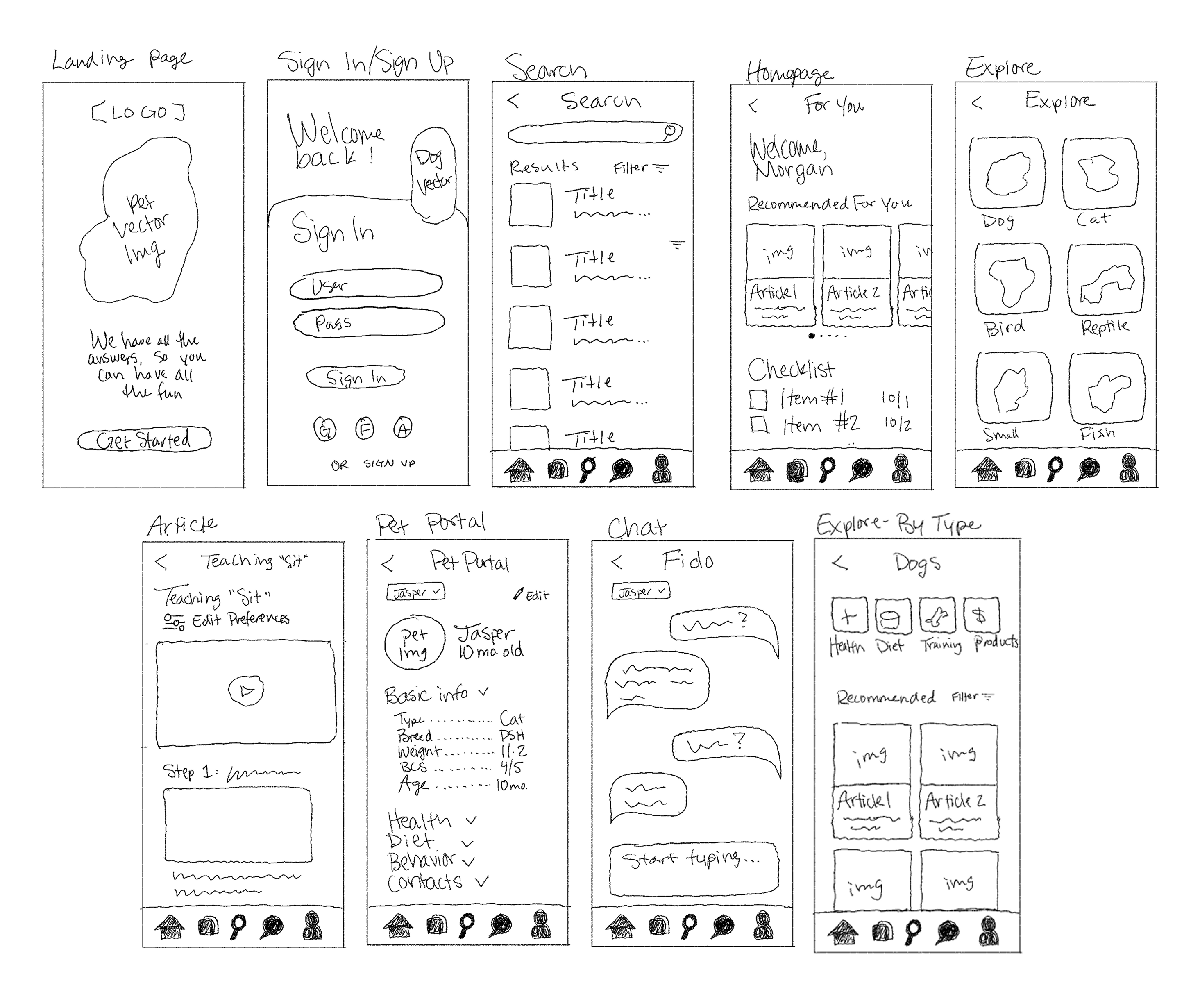
Low-Fi Sketches

low-fi sketches

Final High-Fidelity Screens

Below are mockups of the final screen designs, including any interactions, menus, or popups.

Splash Page & Sign In

A simple, welcoming onboarding flow introduces new users to FetchIt and makes getting started quick and accessible.

Next →

← Back

Accessibility Audit

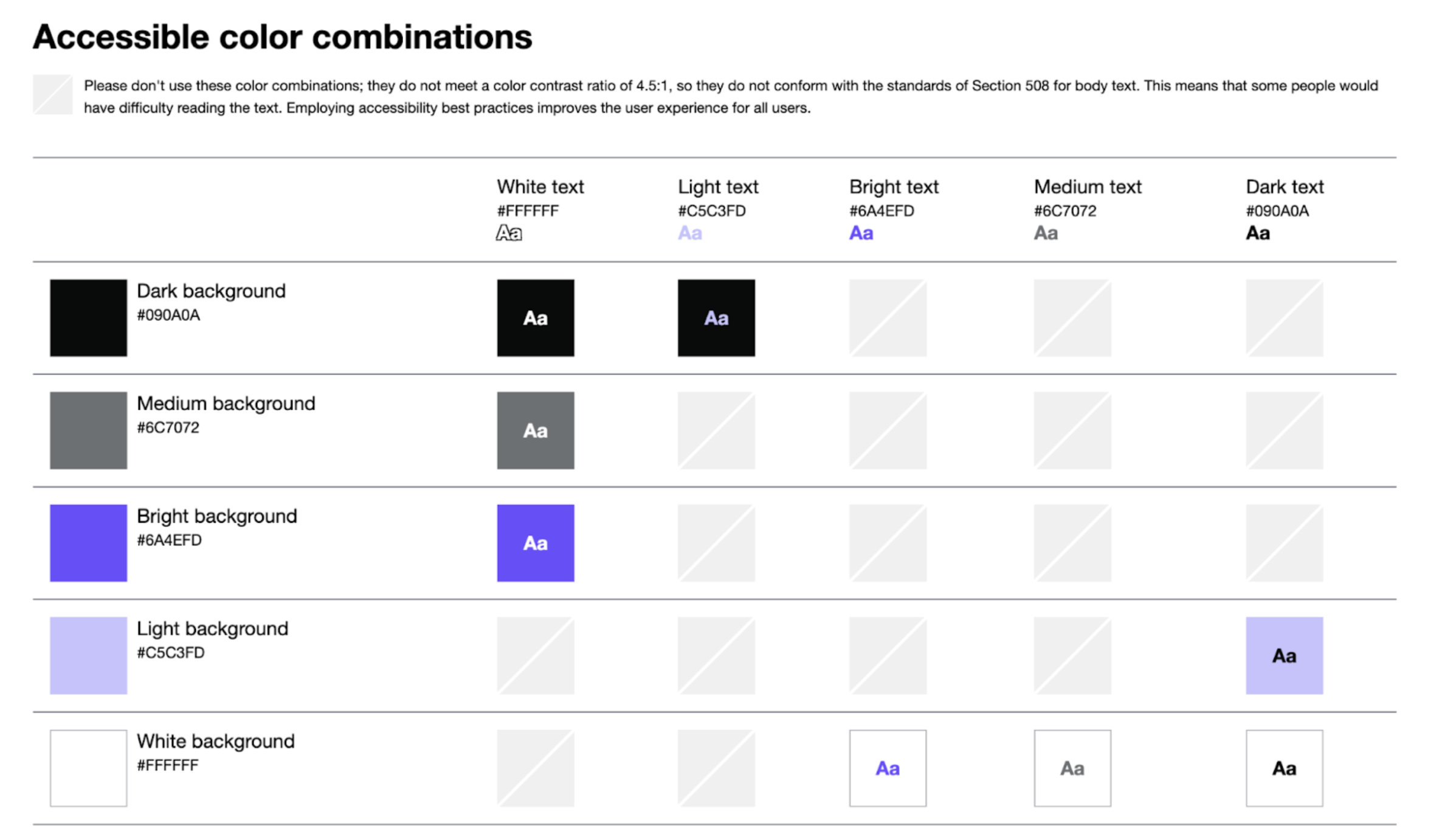
I conducted an accessibility audit using Stark, which identified a handful of areas for improvement. Based on the results, I updated the body text color where it was originally the brand’s primary purple to a darker shade to meet WCAG AAA contrast standards and ensure optimal readability. I also added alt text to all images and visuals to improve compatibility with screen readers and other assistive technologies.

After these updates, I ran a final scan in Stark. The results showed no errors or violations, with the remaining 165 warnings primarily related to missing landmark annotations. Since this prototype is not being developed for production, I did not add those annotations—but they would be included in a developer handoff to support full semantic structure and accessibility compliance.


Overall, the final scan reported 0 issues, 163 potential violations (from missing landmarks), and 2,113 passed checks, confirming a strong accessibility foundation that aligns with best practices.

User Testing

User Flows

In order to conduct the user testing, I created a clickable prototype in Figma. Next, I conducted user testing sessions using the talk-out-loud protocol, encouraging participants to verbalize their thoughts, decisions, and frustrations as they interacted with the interface and completed each of the tasks outlined below.

Task #1: For this task, you will explore the app to find personalized dog training information, specifically an article called “Teaching Sit”. Then open and adjust your reading preferences.


Task #2: For this task, you will add a new pet, a cat named Jasper, to the Pet Portal, providing the necessary details to create its profile. Then, add a second cat named Juno to your portal.


Task #3: For this task, you will interact with Fido, FetchIt’s AI Assistant, to ask a question about a pet's medication and review the advice provided.

Discussion Questions

After each participant completed the three tasks, I asked the following questions to collect feedback on their experience.


  • In your opinion, what is the objective of the FetchIt app?
  • The primary goal of FetchIt is to personalize online pet care, promote inclusive learning and provide a centralized repository of pet care information. Do you feel like the app accomplishes that goal?
  • If you were searching for pet care information, and FetchIt were to be a real app, would you use it? Why?
  • As you worked through the tasks, how was your experience using FetchIt?
  • What did you think about Fido, FetchIt’s AI assistant? If FetchIt were real, would you use this feature?
  • If you could change anything about FetchIt, what would you change?

Design Improvements

FetchIt’s usability testing revealed strong validation for its core concept, with participants consistently understanding its purpose and navigating the prototype with ease. Their feedback highlighted both what resonated—clarity, personalization, and visual design—and where small refinements could elevate the overall experience.

Full Case Study

If you’d like to explore the complete research and testing insights, you can view the full case study at this link.

Updated Fido’s visual identity

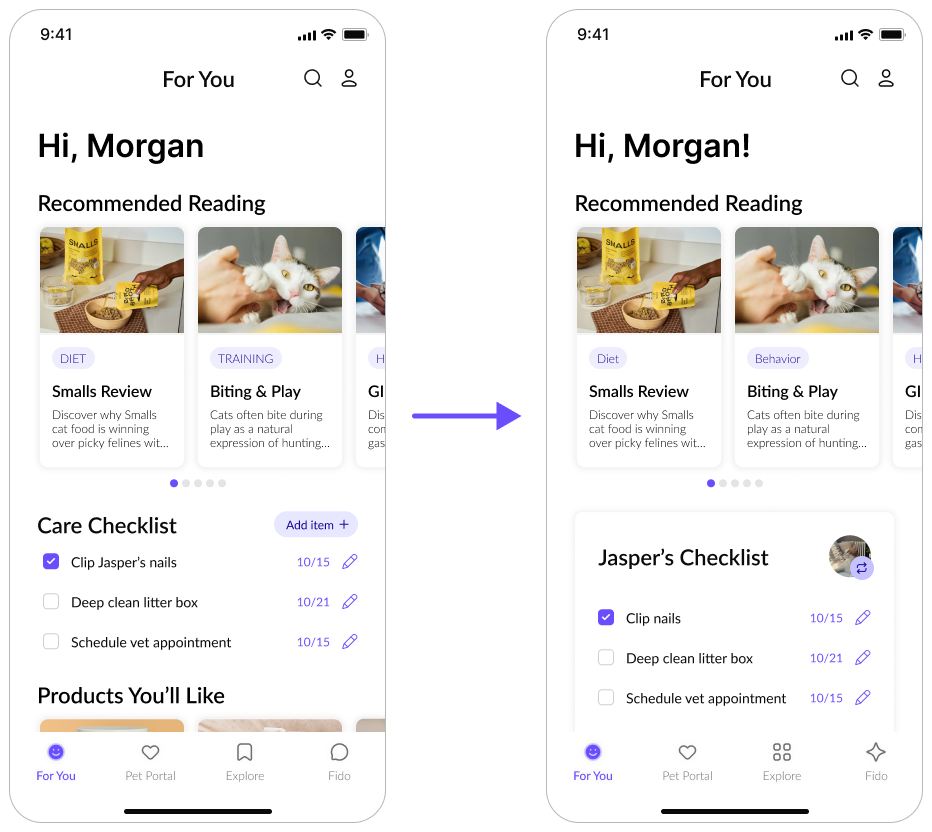
Replaced the chat bubble with an AI “sparkle/star” icon to better signal its purpose as an assistant, and refreshed the Explore icon for consistency and clarity.

Improved checklist visibility

Increased spacing and added clearer visual separation on the homepage so the checklist is easier to notice and less likely to be overlooked.

Added a dedicated “My Pets” page

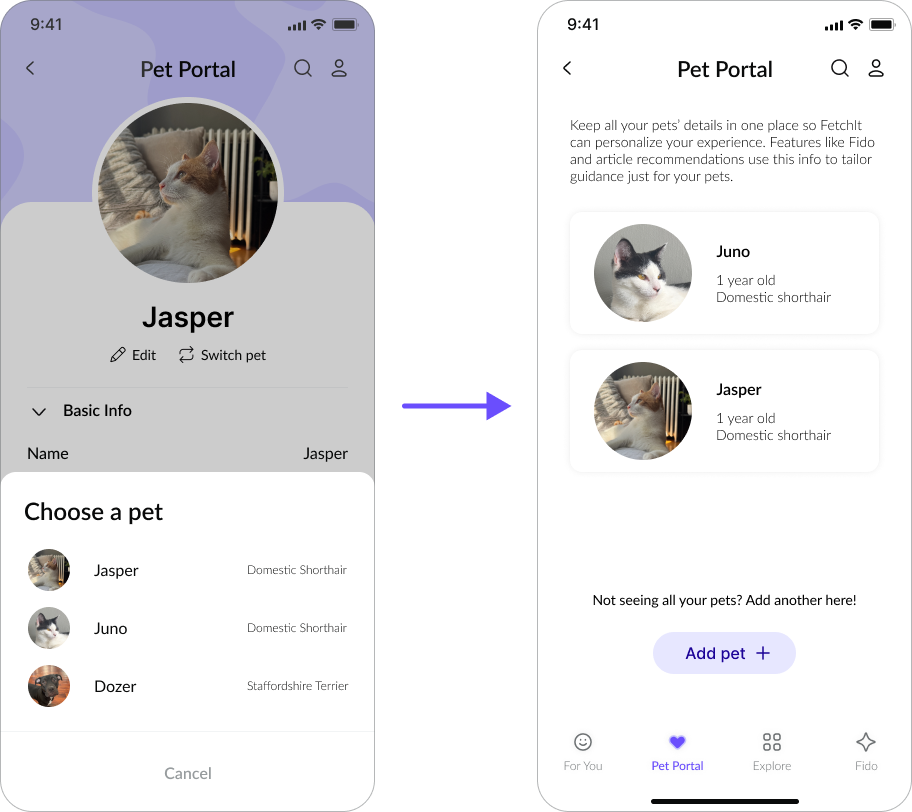
Introduced a clear entry point to the Pet Portal instead of relying on a “Swap Pets” button, and added a short description explaining the portal’s purpose for improved orientation.

These changes improve clarity, discoverability, and overall ease of use while preserving FetchIt’s clean, modern interface.

Prototype

Reflection

A Look BACK

Looking back on this project, FetchIt became a milestone in my growth as a designer—not only because it brought together research, accessibility, and iterative testing, but also because it was my first full mobile design. Exploring a new design medium pushed me to think differently about structure, spatial constraints, and the small interaction patterns that make mobile experiences feel effortless. This project reaffirmed the value of grounding every decision in real user needs, and it showed me how much clarity and confidence users gain when complexity is intentionally reduced. Overall, it was both challenging and genuinely fun, and it expanded my understanding of what thoughtful, inclusive design can achieve.

A Look Forward

As my independent study concludes, the biggest thing I carry forward isn’t the app itself—it’s the toolkit I strengthened throughout the process. I leave this project with a deeper command of user research synthesis, accessibility auditing, prototyping, and iterative refinement based on real behavioral insights. I also gained confidence designing for mobile, orchestrating an end-to-end product flow, and making intentional design decisions that balance clarity, structure, and personality. These skills will directly inform my future work, helping me approach new problems with a stronger process, a more holistic perspective, and a commitment to designing accessible, intuitive experiences wherever I go next.

UX Researcher & Designer

UX Research & Design

FetchIt

A mobile app for pet owners

mobile app mockups

Role

UX Researcher & Designer

Duration

4 months

Tools

Figma, Figjam, Google Drive, Notion


Methodology

Competitive Research, User Interviews, Personas, Affinity Mapping, Wireframes, Prototyping, Accessibility Audit, User Testing

Problem

For first-time pet owners, finding trustworthy information can be stressful and time-consuming. Resources are scattered across articles, videos, forums, and veterinary sites, often using inconsistent or jargon-heavy language. This lack of a unified, accessible system creates confusion and increases cognitive load, especially for users with limited time or accessibility needs.


Solution

FetchIt consolidates pet care knowledge into a single, user-friendly mobile app. By combining conversational AI with short tutorials, clear written guides, and visual aids, FetchIt offers personalized guidance in whichever format works best for each user. The app’s friendly and inclusive design reduces stress, increases confidence, and ensures accessibility for a wide range of new pet owners.


👀 Take a Peek

Splash Page & Sign In

A simple, welcoming onboarding flow introduces new users to FetchIt and makes getting started quick and accessible.

Next →

← Back

Research

Research Questions

  1. What learning formats do pet owners find most effective and engaging?
  2. How can different accessibility needs be accounted for?
  3. In what contexts would users prefer an AI assistant over traditional resources?
  4. What pain points exist in current pet care information resources?

Competitive Analysis

To understand the current landscape of learning and support tools, I analyzed four platforms that provide educational content or community-driven knowledge: Khan Academy, Reddit, PetCoach, and Coursera. I evaluated each based on strengths, weaknesses, features, learning styles supported, and accessibility observations..

I then compared each platform against the six mapped features to determine which features I want to include in my app.

competitive analysis feature matrix

From these comparisons, three clear gaps emerged:

  1. Personalization: Existing tools don’t adapt to the user’s experience level.
  2. Multi-format accessibility: No platform combines text, visuals, video, and conversational guidance in one place.
  3. Balance of trust and ease of use: Must choose between expert information (PetCoach) and approachable advice (Reddit).

These findings directly informed FetchIt’s solution: an inclusive, AI-forward app that combines expert reliability, community-style accessibility, and multiple learning formats in a single mobile platform. By doing so, FetchIt aims to close the gap between trustworthy guidance and flexible learning experiences.

Preliminary Survey

To get an initial understanding of my user base, I created a survey to collect background and demographics information. This covered the following topics:


  1. About you
  2. About your pets
  3. Current habits
  4. AI opinions
  5. Additional information & wrap up

Findings

  • Pet owners seek online information, preferring short articles, infographics, and step-by-step guides.
  • Strong interest in a dedicated AI pet care assistant, despite limited current usage.
  • New pet owners specifically need information on harmful substances and common ailments; AI is helpful for unusual health issues.


Design Implications

  • Offer diverse content formats (articles, infographics, guides) and robust search functionality.
  • Integrate community features for sharing experiences.
  • Develop a prominent, trustworthy, and personalized AI assistant with a feedback mechanism.
  • Implement critical information alerts, a symptom checker, new pet owner onboarding, and pathways to veterinary resources.

Take a look at the survey here!

User Interviews

To begin to understand user needs, I conducted user interviews. I began by brainstorming questions and sorting them into buckets, which would end up mapping directly to my objectives for the interview process.

interview question card sorting

Findings

  • Pet owners seek pet care information online, preferring visual and concise formats.
  • High interest in a personalized AI assistant, but trust and accuracy are key concerns.
  • Friends and family are trusted for non-medical advice; online forums are viewed with skepticism for medical information.
  • Overwhelming information and conflicting advice are major stressors.


Design Implications

  • Offer diverse, visually rich, and concise content.
  • Develop a trustworthy, personalized AI assistant with fact-checking and vet integration.
  • Incorporate community features and clear pathways to professional resources.
  • Design for accessibility with less text-heavy layouts.

Personas & Empathy Mapping

Finally, I compiled the research findings (including competitive analysis, user interviews, and survey) into 3 personas, each with a corresponding empathy map for each, shown below.

new pet owner persona
busy student persona
technology averse persona

Design

Sitemap

Low-Fi Sketches

low-fi sketches

Final High-Fidelity Screens

Below are mockups of the final screen designs, including any interactions, menus, or popups.

Splash Page & Sign In

A simple, welcoming onboarding flow introduces new users to FetchIt and makes getting started quick and accessible.

Next →

← Back

Accessibility Audit

I conducted an accessibility audit using Stark, which identified a handful of areas for improvement. Based on the results, I updated the body text color where it was originally the brand’s primary purple to a darker shade to meet WCAG AAA contrast standards and ensure optimal readability. I also added alt text to all images and visuals to improve compatibility with screen readers and other assistive technologies.

After these updates, I ran a final scan in Stark. The results showed no errors or violations, with the remaining 165 warnings primarily related to missing landmark annotations. Since this prototype is not being developed for production, I did not add those annotations—but they would be included in a developer handoff to support full semantic structure and accessibility compliance.


Overall, the final scan reported 0 issues, 163 potential violations (from missing landmarks), and 2,113 passed checks, confirming a strong accessibility foundation that aligns with best practices.

User Testing

User Flows

In order to conduct the user testing, I created a clickable prototype in Figma. Next, I conducted user testing sessions using the talk-out-loud protocol, encouraging participants to verbalize their thoughts, decisions, and frustrations as they interacted with the interface and completed each of the tasks outlined below.

Task #1: For this task, you will explore the app to find personalized dog training information, specifically an article called “Teaching Sit”. Then open and adjust your reading preferences.


Task #2: For this task, you will add a new pet, a cat named Jasper, to the Pet Portal, providing the necessary details to create its profile. Then, add a second cat named Juno to your portal.


Task #3: For this task, you will interact with Fido, FetchIt’s AI Assistant, to ask a question about a pet's medication and review the advice provided.

Discussion Questions

After each participant completed the three tasks, I asked the following questions to collect feedback on their experience.


  • In your opinion, what is the objective of the FetchIt app?
  • The primary goal of FetchIt is to personalize online pet care, promote inclusive learning and provide a centralized repository of pet care information. Do you feel like the app accomplishes that goal?
  • If you were searching for pet care information, and FetchIt were to be a real app, would you use it? Why?
  • As you worked through the tasks, how was your experience using FetchIt?
  • What did you think about Fido, FetchIt’s AI assistant? If FetchIt were real, would you use this feature?
  • If you could change anything about FetchIt, what would you change?

Design Improvements

FetchIt’s usability testing revealed strong validation for its core concept, with participants consistently understanding its purpose and navigating the prototype with ease. Their feedback highlighted both what resonated—clarity, personalization, and visual design—and where small refinements could elevate the overall experience.

Full Case Study

If you’d like to explore the complete research and testing insights, you can view the full case study at this link.

Updated Fido’s visual identity

Replaced the chat bubble with an AI “sparkle/star” icon to better signal its purpose as an assistant, and refreshed the Explore icon for consistency and clarity.

Improved care checklist visibility

Increased spacing and added clearer visual separation on the homepage so the checklist is easier to notice and less likely to be overlooked.

Added a dedicated “My Pets” page

Introduced a clear entry point to the Pet Portal instead of relying on a “Swap Pets” button, and added a short description explaining the portal’s purpose for improved orientation.

These changes improve clarity, discoverability, and overall ease of use while preserving FetchIt’s clean, modern interface.

Prototype

Reflection

A Look Back

Looking back on this project, FetchIt became a milestone in my growth as a designer—not only because it brought together research, accessibility, and iterative testing, but also because it was my first full mobile design. Exploring a new design medium pushed me to think differently about structure, spatial constraints, and the small interaction patterns that make mobile experiences feel effortless. This project reaffirmed the value of grounding every decision in real user needs, and it showed me how much clarity and confidence users gain when complexity is intentionally reduced. Overall, it was both challenging and genuinely fun, and it expanded my understanding of what thoughtful, inclusive design can achieve.


A Look Forward

As my independent study concludes, the biggest thing I carry forward isn’t the app itself—it’s the toolkit I strengthened throughout the process. I leave this project with a deeper command of user research synthesis, accessibility auditing, prototyping, and iterative refinement based on real behavioral insights. I also gained confidence designing for mobile, orchestrating an end-to-end product flow, and making intentional design decisions that balance clarity, structure, and personality. These skills will directly inform my future work, helping me approach new problems with a stronger process, a more holistic perspective, and a commitment to designing accessible, intuitive experiences wherever I go next.

Full Case Study

Thanks for checking out my work! If you’re interested in the full details, you can read my full final paper here.